
0.6 Managing Your Projects
Open, edit, archive, unarchive, or delete projects from the dashboard.
Read the project card
Each project card shows the information you need before you open it:
- Project name and short description
- Status badge
- Recent stage label
- Script summary and progress
- Updated time
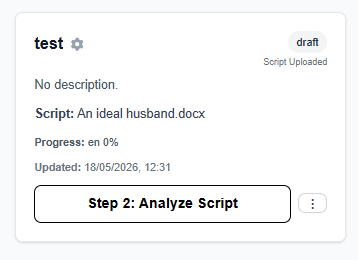
Use the two controls at the bottom
A project card has two separate controls:
- The wide button is the primary action. It takes you to the next workflow step for that project.
- The vertical-dots button opens
quick actions.
What is inside quick actions
Re-upload scriptfor step 1Analyze scriptfor step 2Editor & Simulationfor step 3Post-show reportsUpload preset to projectif your role allows itArchive ProjectDelete ProjectSurtitle Deployment Settings
Archive and delete carefully
- Archive Project keeps the project data but moves it out of the main active list.
- Delete is permanent.
- Archived projects still count toward archive-related limits. If you hit a limit, the UI tells you what to remove or which page to open next.
FAQ
Common questions for this workflow, based on the current Pockitle Cue system.
Will archiving delete my project data?+
No. Archiving hides the project from active work but keeps its data so it can be unarchived later if your limits allow it.
Why can't I archive projects on Free?+
Free includes 10 archived-project slots. Archive projects you are not actively using; delete a project only when you intend to remove it.
Onboarding Workflow
Continue In This Workflow
Account setup, sign-in recovery, first project steps, and invitation acceptance for new users.
1.2 Uploading a Script
Upload a DOCX theatre script to Pockitle Cue, check supported file, unit, and character limits, then prepare it for analysis and editable subtitle cues.
0.8 How to Accept a Team Invitation
Accept a team invitation link, handle email verification, and fix the most common account-mismatch blockers.
0.14 Security Alert Actions
Use sign-in alert links to confirm that a sign-in was yours or report it as suspicious.