
0.11 Managing Organization Identity
Update your organization name as Owner and review the read-only organization ID.
Quick Guide
Route: /dashboard/organization/access
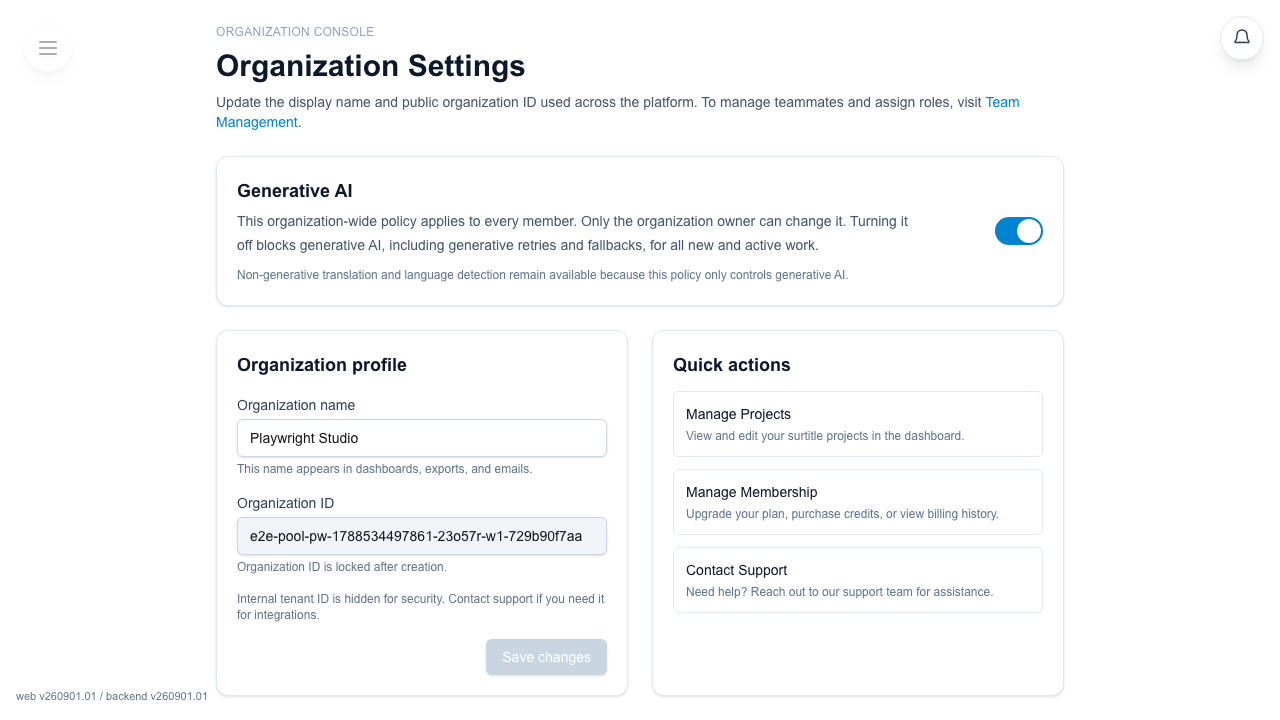
Page title: Organization Settings
Console label: Organization Console
What you can change
- Organization name is editable by the organization Owner on every tier.
- Organization ID is shown but locked.
- The internal tenant ID is not shown on this page.
What the page looks like
The editable form is on the left. A Quick actions panel is on the right.
- Manage Projects
- Manage Membership
- Contact Support
Restrictions
- Only owners can submit changes.
- The submit button in the form footer reads
Save changes.
FAQ
Common questions for this workflow, based on the current Pockitle Cue system.
Why can't I edit Organization Identity?+
Only the organization Owner can submit name changes. Free and Lite Owners can edit the name too.
Can I change my organization ID there?+
No. The current page lets you edit the organization name, but the organization ID is shown as locked and read-only.
Billing Workflow
Continue In This Workflow
Membership, credits, refund requests, codes, and organization or team-management actions tied to account administration.
0.12 Managing Membership, Billing & Credits
Buy or extend an Access Pass, review credits, and manage billing records.
0.13 Viewing Credit Usage
Track AI credit consumption, plan-credit grants, and what happens when you run low.
0.18 How to Request a Refund in Pockitle Cue
Request a refund from the Membership page and understand the current refund eligibility and review flow.