Pockitle Product Updates

SurtitleLive is now Pockitle Cue. Earlier release entries keep the name used when they were published.

November 2026

Week of November 15 – 21, 2026

v261119.01

Released: November 19, 2026

This release makes Pockitle’s guides easier to navigate, improves Editor recovery when a connection is interrupted, and makes email verification easier to complete.

New: Added a downloadable English introduction pack.

Improved: Redesigned the Cue and Live guide indexes so you can browse the full catalog by workflow stage or search for a specific guide.

Improved: Reorganized the planning page by use case, with a comparison table to help you choose the right workflow.

Improved: Made the Editor more reliable when opening a script or recovering from a connection interruption.

Fixed: Fixed cases where a completed translation could sync to the wrong editing session or dragging a row could use an outdated row position.

Fixed: Email verification now distinguishes expired links from other failures and lets you request a fresh link when needed.

v261116.01

Released: November 16, 2026

This update improves Editor collaboration and script workflows, strengthens live-show recovery, and refreshes the homepage theatre preview.

New: Added Polish and Ukrainian to the localized public pages.

Improved: Updated the translated-script Excel template and import flow to support current and earlier formats while preserving speaker roles, stage directions, translations, and line details.

Improved: Improved Editor collaboration and recovery, including line locks, connection interruptions, script switching, and translation synchronization.

Improved: Improved script analysis to better distinguish stage directions from dialogue and handle performer references.

Improved: Updated the homepage theatre simulator with a more detailed auditorium, stage, performers, lighting, and audience phone.

Improved: Improved live Show recovery during conflicting configuration changes, preserving the reviewed duration.

Fixed: Fixed Editor cases where translation protection could end too early, work could interfere across scripts, or drag-and-drop could use an outdated row position.

v261115.01

Released: November 15, 2026

This update makes translated-script Excel imports more flexible and easier to use.

Improved: Updated the translated-script Excel template to put speaker roles before source text.

Improved: Excel import now recognizes the current role-first template and earlier type-first templates and Editor exports, preserving speaker roles, stage directions, translations, and line metadata.

Week of November 8 – 14, 2026

v261113.01

Released: November 13, 2026

This update improves Project Viewer URL controls, language consistency, and Editor guidance.

Improved: Project Viewer URL changes are now explicit. Go Live uses the saved URL, with clear prompts to save or discard unsaved edits.

Improved: Improved language consistency across Editor, project, and account workflows, including notices and error messages.

Improved: Updated Editor guides and FAQs across supported languages with clearer guidance on translation protection, translated-script import, and export.

Fixed: Fixed cases where workflow notices or errors could appear in a language different from the selected interface language.

v261110.01

Released: November 10, 2026

This release expands Editor collaboration and Project Viewer options, while improving draft recovery and live-show reliability.

New: Added line-level discussions in Editor, with comments filterable by language.

New: Added custom Project Viewer URLs and downloadable QR codes on eligible plans. Set a URL when creating a Project or before deployment.

New: Added browser-based recovery for unsaved Editor drafts after concurrent edits or row/language removal. Drafts are stored in your browser, not in the cloud.

Improved: Editor now shows translation approval and review status. Approved translations are protected, and collaborators can request another review after source text changes.

Improved: Improved collaborative editing and draft recovery when multiple people make changes.

Improved: Improved live caption updates and audience reconnection after interruptions.

Improved: Refreshed the public site with consistent Pockitle branding, downloadable brand assets, and clearer localized workflow and Editor guides.

Improved: Clarified feedback for invalid or already-used Project Viewer URLs.

Fixed: Fixed an issue that could interrupt an in-progress live caption update.

Week of November 1 – 7, 2026

v261106.01

Released: November 6, 2026

This release improves Viewer reconnection, account verification recovery, and repeat-performance setup.

Improved: Viewers now show a localized countdown while automatically reconnecting after a brief interruption.

Improved: Improved sign-in and registration recovery when verification is slow or unavailable, with clearer status and a retry option.

Improved: Reworked the workflow guide with a clearer end-to-end setup path, including Cue Station and QLab.

Fixed: Fixed a repeat-performance issue that could leave you stuck when your plan could not accommodate a Show’s existing language setup. The dialog now explains the issue and provides clear next steps.

v261102.01

Released: November 2, 2026

This release adds live caption controls and improves script analysis and translation.

New: Added a Hide/Show captions control during a live Run. Hide audience captions without stopping the Run, then restore them when needed.

New: Added a dedicated Pockitle Cue Station download page and refreshed the QLab setup guidance.

Improved: Long script analysis now shows clearer progress through review stages, including document and page review.

Improved: Improved long-script translation speed with concurrent batch processing while keeping results in order.

Fixed: Fixed translation handling for lines containing only punctuation, symbols, or numbers; these lines now keep their original text.

October 2026

Week of October 25 – 31, 2026

v261028.01

Released: October 28, 2026

This release adds a one-person script option, improves script analysis and translation, and updates product naming.

New: Added an optional “This is a one-person piece” setting to script analysis. You can edit the performer’s character name before analysis; unnamed lines are attributed only when analysis confirms they are spoken.

New: Added document-level review for heavily flagged or stage-dominated scripts to help distinguish speech, stage directions, and speaker labels.

Improved: Improved long-running script translations with background processing, clearer progress, and more reliable recovery from interruptions.

Improved: Renamed Pockitle Cue for Mac to Pockitle Cue Station across the product site and guides.

Improved: Improved live subtitle update recovery and stabilized caption previews in the Pockitle Live Console.

Fixed: Fixed a timeout case where an in-progress translation could appear to have failed before its final status was known.

v261025.01

Released: October 25, 2026

This release moves QLab synchronization out of the web workflow and makes QLab imports safer.

Improved: Moved QLab synchronization from the web workflow to Pockitle Cue for Mac; web-based QLab sync-pack downloads are no longer available.

Improved: QLab Projection Pack imports now preserve existing caption settings by default. Replacing them with pack settings requires confirmation.

Fixed: Fixed early Free daily-limit reminders; the notice now appears closer to the end of the allowance.

Week of October 18 – 24, 2026

v261021.02

Released: October 23, 2026

This update adds ASM sign-in to the existing free deployment preview and improves Simulation, deployment, and Access Pass guidance.

New: Added an ASM login password to the existing free deployment preview, allowing operators to sign in to the ASM during a preview.

New: Localized the Simulation workflow across supported languages, including controls, deployment choices, and status messages.

Improved: Clarified plan comparisons with deployment capacity, audience size, duration, and Pass extension details.

Improved: Improved deployment-limit guidance with current usage, links to manage deployments or review membership options, and clearer purchase-eligibility messages.

Improved: Clarified where to renew an Access Pass and how to extend a deployment afterward.

Fixed: Fixed the Audience Viewer privacy notice’s language metadata so it follows the selected language and text direction.

v261021.01

Released: October 21, 2026

This release adds deployment-capacity controls and improves Pockitle Live, the Audience Viewer, script analysis, Projection Setup, and account-status clarity.

New: Added separate deployment-usage tracking to the Projects page, showing active deployments and requests still preparing, with controls for eligible unfinished requests.

New: Added the option to purchase one additional deployment slot when an account reaches its limit. Eligible accounts can also claim a one-time emergency slot.

New: Added a By line sending mode to Pockitle Live’s stenotype input, alongside Auto.

Improved: Increased concurrent active deployment limits: Lite from 1 to 2, Pro from 3 to 5, and Pro+ from 5 to 10.

Improved: Clarified how additional slots follow Pass expiry: they carry forward when a Pass is renewed or upgraded within the same period, and expire with the Pass.

Improved: Improved Auto caption sending. It now uses language-aware sentence boundaries, sends a sentence when you begin the next one or pause, and keeps the current unsent text editable. Long text without punctuation is sent after a short wait.

Improved: Updated the Audience Viewer to preselect an available subtitle language that best matches the viewer’s browser preferences, while respecting a previously selected language when it remains available.

Improved: Improved script analysis for explicit screen and projection labels, helping keep displayed text classified as stage directions rather than dialogue or character names.

Improved: Improved Projection Setup preset handling so delayed saves or loads are less likely to override the operator’s latest choices.

Improved: Updated the Pockitle Live product page to show the console on both iPhone and landscape iPad.

Improved: Made account-deletion status clearer when revocation of linked sign-in access cannot be confirmed.

Fixed: Fixed cases where an abandoned, unpublished deployment request could continue to hold a slot; recovery now leaves active or ambiguous deployments protected.

Fixed: Fixed a race between QLab settings changes and cue updates that could cause one change to overwrite the other.
v261020.01

Released: October 19, 2026

This release adds operator-entered captions to Pockitle Live and makes live subtitle updates safer and easier to recover.

New: Added browser-based text input for Pockitle Live, so an operator can type and publish captions without a microphone.

New: Added an approval step in the live ASM Console for subtitle updates during a Show.

Improved: Text-only Update Live edits now keep the performance running and preserve the current cue and audience-language setup.

Improved: Improved recovery for interrupted subtitle updates, while keeping the previous captions active.

Fixed: Fixed cases where text-only edits were rejected during a live Show as if they changed the subtitle structure.

Week of October 11 – 17, 2026

v261016.01

Released: October 16, 2026

This release improves script analysis and live-show recovery, and introduces an accessibility partnership page.

New: Added an Accessibility Partnership page with an application path for theatre productions.

Improved: Script analysis now keeps unassigned dialogue visible for review and no longer mistakes Word page-number fields for script content.

Improved: Improved live-show reconnection and end-of-show recovery.

Improved: Expanded localized product pages and setup guides.

v261013.01

Released: October 14, 2026

This release adds multilingual spoken-language support to Pockitle Live and improves script analysis and audience captioning.

New: Pockitle Live can now handle multiple spoken languages in one Show. Select the languages in order; captions appear as original speech in the matching language room and are translated for other selected audience languages.

Improved: Refreshed the homepage and feature pages to explain Pockitle’s product lineup and audience-phone captioning more clearly.

Improved: Improved script analysis so numbered character names are less likely to be merged with other roles.

Improved: Improved Audience views so full caption paragraphs stay readable and new captions do not interrupt people reviewing earlier lines.

Fixed: Fixed cases where delayed live-caption delivery could disrupt capture or transcript progress.

Fixed: Fixed Audience recovery cases where prepared content or the final session status did not refresh correctly after a pause.

v261011.01

Released: October 11, 2026

This release improves script preparation, live-show reliability, and projection workflows.

Improved: Script analysis handles speaker cues within dialogue more carefully while keeping results linked to the source script.

Improved: Replacing or restoring a script now refreshes the project and clears outdated translation progress.

Improved: Pockitle Live setup checks the latest Show and audience-link status before opening a live session.

Improved: Projection previews offer clearer pre-show guidance. QLab caption updates fit the selected display more reliably and preserve existing text formatting.

Improved: Updated localized product and QLab guides with more reliable section navigation.

Fixed: Expired or deleted Show deployments are no longer shown as active, and retired runtime links are not refreshed.

Fixed: When a Show deletion completes but its response is interrupted, the page confirms the completed removal without retrying the deletion.

Fixed: Fixed cases where an interrupted Show-control transition could delay later updates.

Fixed: Fixed projection controls that did not respond consistently to mouse, touch, and keyboard input.

Week of October 4 – 10, 2026

v261009.01

Released: October 9, 2026

This release improves script analysis, live-show recovery, and membership-code access.

New: Added a Pockitle Product Reference page with product descriptions, availability, terminology, and answers to common questions.

Improved: Script analysis better recognizes cast members and speaker cues in complex scripts, including inline cues, while keeping results tied to the source text.

Improved: Live subtitle updates recover more reliably after interruptions. Audience screens retain the last confirmed captions while an update is being recovered.

Improved: Membership-code benefits now follow the same feature and active-Show capacity rules as equivalent paid memberships.

Fixed: Fixed a Show-control issue that could leave a live subtitle update waiting after an interrupted change.

Fixed: Fixed the deployment dialog incorrectly reporting that no deployment existed when its settings could not be loaded.

v261007.01

Released: October 7, 2026

This release improves script analysis and makes live-show preparation and recovery more reliable.

Improved: Script analysis better recognizes speakers in short scripts and line-broken dialogue, including cast-name variants.

Improved: Saved Cast Review decisions carry through analysis and Editor preparation more reliably.

Improved: Audience and operator screens recover more reliably after interrupted script loading or a connection drop.

Improved: Cue navigation and live updates handle changing script content more safely.

Fixed: Fixed cases where removing every known spelling of a cast member did not remove them consistently from analysis.

Known issues: If deployment settings cannot be loaded, the Projects page may incorrectly say that no deployment exists.

Known issues: Redeeming a membership code may save the new membership before capacity updates reach active Shows.

Known issues: An undeleted, unexpired ready Show may continue to count toward the deployment limit when creating another Show.

v261005.01

Released: October 6, 2026

This release improves script analysis and makes translated-script editing more reliable.

Improved: Script analysis better recognizes centered speaker cues, even when a cast list is missing.

Improved: Dialogue, settings, and headings are less likely to be mistaken for front matter during script analysis.

Improved: Editor translation results stay in sync more reliably, helping protect recent edits.

Fixed: Valid translations that leave existing text unchanged are now accepted.

v261004.01

Released: October 4, 2026

This release expands live translation capacity and improves recovery across performances, script review, and account sessions.

New: Pockitle Live now supports up to 10 translated languages, depending on your plan.

New: Script analysis and translation jobs now provide clearer summaries and next steps when items need review.

Improved: Improved access continuity for viewers and operators after a performance is extended, a connection drops, or show services restart.

Improved: Update Live now explains when show services are starting and offers clear retry guidance.

Improved: Translation jobs now identify skipped or failed lines more clearly while preserving translations already saved.

Fixed: Fixed viewer or operator access expiring after a performance was extended.

Fixed: Fixed an End Show timing conflict that could trigger a false warning that another console had taken control.

Fixed: Fixed delayed sign-in or sign-out actions from affecting the wrong active account session.

September 2026

Week of September 27 – October 3, 2026

v260930.01

Released: September 30, 2026

SurtitleLive is now Pockitle Cue, with major improvements to live caption recovery and audience access.

New: Introduced Pockitle Cue as the new name for SurtitleLive across the public product experience, with localized pages and clearer navigation from product information to the script-to-stage workflow.

Improved: Improved live caption delivery and recovery across live updates, reconnects, and performance restarts.

Improved: Extended Audience Show link recovery so valid pages remain accessible even after the live runtime ends.

Fixed: Fixed paused Pockitle Live sessions ending unexpectedly.

Fixed: Fixed audience blackout state being lost when an operator reconnects.

Fixed: Fixed Viewers showing a different line when a cue could not be matched; they now retain the current caption.

Fixed: Fixed final caption updates being lost when a live session stops.

Fixed: Fixed public pages becoming unresponsive after browser translation changes their content.

Week of September 20 – 26, 2026

v260923.02

Released: September 23, 2026

This release improves audience-link continuity and per-screen previews, and fixes Editor review and sign-in issues.

Improved: Audience Show links remain accessible after a performance restart.

Improved: Each projection preview now keeps its own selected language.

Fixed: Fixed reviewed Editor lines being flagged again after a script is reopened.

Fixed: Fixed fresh sign-in being blocked after a browser session is replaced.

v260923.01

Released: September 23, 2026

This release adds manual accessibility captions and improves live updates, transcript downloads, and account controls.

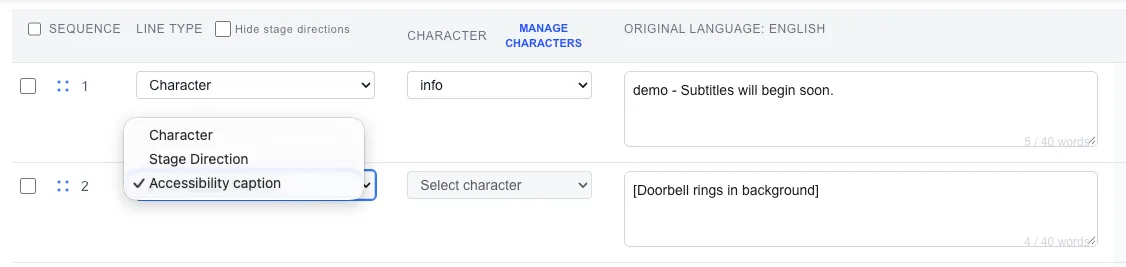
Editor line-type menu with Accessibility caption selected and the example [Doorbell rings in background].

New: Added manual accessibility captions in the Editor. They appear as bracketed cues in simulations, projections, and audience views.

Improved: Made live subtitle updates more reliable across connected screens, with better recovery when delivery is interrupted.

Improved: Improved audience-view recovery after reconnects and session changes.

Improved: Simplified live-session transcript downloads into a CSV with time, original text, and translation columns, while preserving distinct corrections.

Improved: Clarified that Access Passes purchased in the Pockitle app must be extended in the app.

Improved: Improved the account-deletion flow so users can review or cancel a pending request after signing out.

Fixed: Fixed live stage directions being wrapped in extra parentheses.

v260921.01

Released: September 21, 2026

This release restored localized Pockitle entry points and expanded the promoted public-language experience.

New: Added Brazilian Portuguese public pages and planning content to the localized Pockitle experience.

Improved: Restored the locale-specific Get started action on Pockitle Live pages and corrected localized public navigation.

v260920.01

Released: September 20, 2026

This release expanded account controls and improved preparation before a live session.

New: Expanded Account settings with identity details, password-reset access, legal-consent review, sign-out-all-devices controls, and account-deletion status or cancellation.

Improved: Improved stage-input checks, microphone setup guidance, and audience readiness before going live.

Improved: Improved account deletion and linked-session cleanup.

Week of September 13 – 19, 2026

v260918.01

Released: September 19, 2026

This release made project recovery and imported script structure more dependable.

Improved: A temporary script lookup failure no longer makes a project appear to have no script; the project can retry while existing data remains available.

Improved: Script imports better preserve italic dialogue and explicit stage directions that follow dialogue.

v260915.01

Released: September 16, 2026

This release introduced a dedicated localized public home and Live entry for Pockitle.

New: Added the localized public Pockitle home and Live experience, with matching navigation, contact and legal pages, installable web metadata, and visual identity.

v260913.01

Released: September 13, 2026

This release improved recovery guidance, expired-session handling, and imported cue structure.

Improved: Operator unlock and password-recovery messages now explain the next step more clearly.

Improved: Script analysis better retains typed cue structure in imported documents.

Fixed: Expired audience snapshots and retired viewer sessions no longer present stale live content.

Week of September 6 – 12, 2026

v260911.01

Released: September 11, 2026

This release improved recovery across projects, registration, and resumed live sessions.

Improved: Project and registration screens recover more gracefully from temporary data or asset-loading interruptions.

Improved: Operators can recover live control more reliably after resuming a session, and retained reports reopen more dependably.

v260909.01

Released: September 9, 2026

This release improved long-running sessions, audience feedback, and script imports.

Improved: Long-running live sessions recover more reliably.

Improved: Script imports better retain cast and cue context.

Fixed: Audience feedback drafts are preserved after a restart, and feedback can still be submitted after a performance ends.

v260908.01

Released: September 8, 2026

This release added an optional post-show audience feedback journey and improved report continuity.

New: Added an optional post-show audience survey with clear consent and an end-of-show report journey.

Improved: Kept Live Console and audience screens available throughout a performance.

Improved: Improved feedback drafts and report history across restarts and earlier sessions.

August 2026

Week of August 30 – September 5, 2026

v260904.03

Released: September 5, 2026

This release corrected signup and several end-of-performance recovery cases.

Improved: Completion and recovery messages are now localized.

Fixed: Signup now completes account setup before opening the dashboard.

Fixed: Shows navigation and performance-end controls recover more reliably.

Fixed: Pausing a performance now preserves the final caption line.

v260904.02

Released: September 5, 2026

This release improved first-time setup, simulation launch, and localized workflow guidance.

Improved: First-time setup no longer shows a false dashboard failure while account setup is still completing.

Improved: Simulation launch now waits for the active project context, avoiding handoff failures during loading.

Improved: Localized product copy and workflow guidance are more consistent across supported languages.

Fixed: Runtime links and no-content responses now complete cleanly instead of stalling or rendering incorrectly.

Week of August 23 – 29, 2026

v260827.01

Released: August 27, 2026

This release expanded event-planning guidance and improved public navigation on tablets.

New: Added planning guidance for live captions at conferences, classrooms, panels, and other spoken events.

Improved: Expanded translated workflow examples and planning guides across supported locales.

Fixed: Restored complete public navigation on tablet-sized layouts.

v260826.02

Released: August 26, 2026

This release made live-session startup clearer and more resilient.

Improved: Microphone-permission errors now provide a clearer recovery path.

Fixed: Repeated show-start requests now continue the existing startup attempt instead of creating duplicate session state.

v260826.01

Released: August 26, 2026

This release improved caption typography across audience and projection views.

Improved: Audience and projection captions now use consistent language-aware fonts and honor the selected font size without silently shrinking text.

v260824.01

Released: August 24, 2026

This release improved the mobile audience monitor across phone layouts.

Improved: Current captions, language selection, live status, and viewer count remain readable across supported phone layouts.

Improved: Improved language-output continuity when one output is temporarily unavailable.

Week of August 16 – 22, 2026

v260822.01

Released: August 22, 2026

This release expanded the localized Pockitle experience and refined projection history.

New: Added localized public Pockitle pages and a supported-language catalog.

Improved: Public navigation and language menus remain usable on tablets and narrow screens.

Improved: Projection preview can show a bounded number of previous captions while keeping the current caption clear.

v260818.01

Released: August 19, 2026

This release improved repeat-performance preparation, projection controls, and DOCX imports.

Improved: Improved preparation for repeat performances and refined projection controls.

Fixed: DOCX imports now preserve scene headings and reject oversized or malformed uploads with a clear result.

v260817.01

Released: August 17, 2026

This release expanded localized discovery and made audience reconnection more consistent.

New: Expanded localized public discovery and event or live-caption guidance.

Improved: Audience and live-session state handling now keeps reconnects and accepted captions more consistent.

v260815.01

Released: August 16, 2026

This release refined live-session control, projection setup, and Editor collaboration.

Improved: Refined projection setup with clearer controls, reusable presets, and safer output handling.

Improved: Improved Editor saving, history, collaboration, and structural editing reliability.

Improved: Expanded script analysis for fragmented, cue-less, and less-structured documents.

Improved: A newly opened Live Console remains read-only while another console is active or starting, with an explicit Take Over action.

Fixed: Fixed reconnection, state-synchronization, and operator-control issues during live sessions.

Week of August 9 – 15, 2026

v260812.01

Released: August 12, 2026

This release added organization-level generative AI controls and clearer live-session readiness.

New: Added an organization-wide control for generative AI while keeping standard machine translation available.

Improved: Added an audience-readiness check before a live performance starts.

v260810.01

Released: August 10, 2026

This release expanded the localized Pockitle experience.

New: Added localized Pockitle product pages, language information, and workflow guides.

Improved: Improved Pockitle page layouts on narrow screens.

Week of August 2 – 8, 2026

v260807.01

Released: August 7, 2026

This release introduced Pockitle Live Beta and expanded script and Editor workflows.

New: Introduced the Pockitle Live Web Beta for unscripted live captions and translation, with Audience links, multilingual output rooms, browser projection, and manual caption controls.

New: Added bulk actions for editing multiple script lines.

Improved: Script analysis now supports less-structured documents with fewer or no explicit cues.

v260805.01

Released: August 5, 2026

This release made manual Editor changes more dependable.

Fixed: Fixed an issue that could discard or overwrite manual Editor changes.

July 2026

Week of July 26 – August 1, 2026

v260726.01

Released: July 26, 2026

This release improved script imports and Editor recovery.

Improved: Script imports handle fragmented Word documents and documents with less explicit cues more reliably.

Improved: Improved Editor recovery after translation timeouts, preserving edit history and temporary lines.

Week of July 19 – 25, 2026

v260722.01

Released: July 22, 2026

This release improved live-session synchronization and Editor recovery.

Improved: Operator consoles and audience viewers synchronize more reliably after reconnecting or joining a live session.

Week of July 12 – 18, 2026

v260712.01

Released: July 12, 2026

This release improved QLab output options and live cue recovery.

Improved: QLab packs now support safer downloads and re-imports.

Improved: Live cue state recovers more reliably when an operator console reconnects or receives an update.

Week of July 5 – 11, 2026

v260708.01

Released: July 8, 2026

This release made QLab show packs more flexible and reusable.

Improved: Added options for routing QLab outputs to the same screen or separate screens.

v260706.02

Released: July 6, 2026

This release improved QLab pack handling.

Improved: Added per-output language options for QLab packs.

v260705.02

Released: July 5, 2026

This release brought QLab-based surtitles to the web.

New: Introduced beta QLab cue sync for projected surtitles and audience captions, with setup guides for preparing a show.

June 2026

Week of June 28 – July 4, 2026

No updates listed this week.

Week of June 21 – 27, 2026

v260624.01

Released: June 24, 2026

This release expanded QLab show preparation and audience recovery.

New: Added configurable QLab Projection Packs and offline spreadsheet exports for show preparation.

Improved: Audience displays reconnect more reliably after brief interruptions.

v260621.01

Released: June 21, 2026

This release improved script analysis and localized guidance.

Improved: Script analysis better handles dialogue without speaker labels or with names separated from dialogue.

Improved: Localized script-check guidance is clearer across supported languages.

Week of June 14 – 20, 2026

v260616.01

Released: June 16, 2026

This release improved caption continuity and audience feedback recovery.

Improved: Audience feedback can be retried after a temporary connection problem.

Fixed: Empty live updates no longer replace the current caption.

v260615.01

Released: June 15, 2026

This release improved live-session recovery.

Improved: Live controls and audience views recover more reliably after brief connection interruptions.

v260614.01

Released: June 14, 2026

This release added a time-limited pass and improved script and audience workflows.

New: Added a Show Week Pass for time-limited access during a production week.

Improved: Made it easier for audience members to return to the original language while viewing captions.

Fixed: Script analysis now preserves dialogue that follows cast-list material.

Week of June 7 – 13, 2026

v260607.01

Released: June 7, 2026

This release added QLab export tools for show preparation.

New: Added downloadable QLab cue maps and show-preparation exports.

May 2026

Week of May 31 – June 6, 2026

v260604.01

Released: June 4, 2026

This release clarified live-session guidance and polished localized guides.

Improved: Clarified Go Live guidance and restored media and captions across localized product guides.

Fixed: Fixed the display of highlighted pricing-plan cards.

v260601.01

Released: June 2, 2026

This release added script-review controls and strengthened collaboration.

New: Added an editable cast-review step before script analysis.

Improved: Improved script analysis for cast lists, fragmented dialogue, and unclear speaker cues.

Fixed: Restored collaborators’ ability to delete their own saved versions.

Week of May 24 – 30, 2026

v260527.01

Released: May 27, 2026

This release clarifies translation options and improves language switching.

Improved: Made standard and AI-assisted translation options easier to compare on the pricing page.

Improved: The public language selector now keeps your chosen language as you move between pages.

v260525.01

Released: May 25, 2026

This release adds product information and improves language handling in access tools and editing.

New: Added a public About page.

Improved: Improved language support in the Front-of-House Access Pack.

Fixed: Fixed unsaved character-translation edits being lost when switching languages.

Week of May 17 – 23, 2026

v260523.01

Released: May 23, 2026

This release improves script analysis and translation context and clarifies public product information.

Improved: Improved recognition of dialogue and speaker cues across more script layouts.

Improved: Improved translation consistency by using more surrounding script context.

Improved: Clarified product and plan information on public pages.

v260518.02

Released: May 20, 2026

This release adds post-show information, live-update controls, and clearer ways to explore the product.

New: Added printable post-show reports that show which languages were offered during a performance.

New: Added a Front-of-House Access Pack to share audience access information with venue teams.

New: Added version history, preview, and restore controls for live subtitle updates.

New: Added product demo videos and expanded localized product guides.

Week of May 3 – 9, 2026

v260508.01

Released: May 8, 2026

The homepage now gives projection and mobile surtitles a clearer introduction.

Improved: Refocused the homepage to help visitors explore projection and mobile-surtitling workflows.

v260504.02

Released: May 4, 2026

The public site now better supports commercial subtitle use cases.

New: Added dedicated pages for commercial venues and event use cases.

April 2026

Week of April 5 – 11, 2026

v260407.01

Released: April 7, 2026

The public site adds a more consistent localized experience.

New: Added localized public pages and language switching that keeps visitors on their current page.

v260405.01

Released: April 5, 2026

Script analysis now handles a wider range of layouts and speaker cues.

Improved: Improved recognition of dialogue boundaries and speaker cues in scripts with varied formatting.