SurtitleLive Launches Pockitle: Live Captions for Unscripted Performance
SurtitleLive is now Pockitle Cue.
Some performance text can be prepared months in advance. Other words do not exist until a performer, speaker or audience member says them.
SurtitleLive has officially launched Pockitle, a live captioning tool for theatre, talks, panels, workshops, Q&As and other spoken events where a finished caption script is not available.
Pockitle listens to one spoken language, creates live captions in that language, and can add up to three caption languages through machine translation. Audience members open the captions on their phones through a web link or QR code, while the venue can show one selected language on a shared screen.
There is no caption script to upload and no prepared cue sequence to operate.
Pockitle is not intended to replace SurtitleLive’s prepared surtitling workflow. The two products begin from different kinds of text:
- SurtitleLive is designed for words that can be prepared, edited, translated, rehearsed and cued.
- Pockitle is designed for words that must be captioned as they are spoken.
Choosing the right one begins with a simple question:
Do you know what will be said before the performance starts?
What Pockitle does
Pockitle provides a browser-based workflow for turning live speech into captions for a room.
A production or event team can:
- select one language that will be spoken during the event;
- publish live captions in that original language;
- add up to three translated caption languages;
- give audience members one link or QR code;
- allow each audience member to choose an available language on their phone;
- show one selected caption language on a venue screen;
- start, pause, resume and monitor captioning from the Pockitle Live Console;
- add prepared notices for important non-speech moments where appropriate;
- optionally save a timestamped caption record for review after the event.
Audience members do not need to install an app.
The same committed caption state can serve personal phone viewing and a shared venue display. The operator does not need to publish an independent caption sequence for every audience screen.
How to use Pockitle
The practical workflow is deliberately straightforward.
1. Create a show
Start with New show and create the audience address that will belong to that show.
This address can be shared as a link or QR code. Audience members use it to enter the caption viewer before or during the event.
2. Choose the languages
Select the one language that will be spoken during the performance or event.
That language is included as the original caption output. You can then add up to three translated caption languages for the audience.
Choose only the languages the production can test before opening the room.
3. Prepare and test the audio input
Pockitle can work from a microphone, but a controlled dialogue feed from the venue mixer is usually more dependable.
Use the real microphone, computer, browser, mixer route and room conditions during the input test. A clean speech signal matters more than the position of the QR code.
Music, room reflections, applause, overlapping voices and distant microphones can all affect recognition.
4. Prepare the audience and venue outputs
Place the audience link or QR code where people can find it before the event begins: in a digital programme, at the box office, near the entrance or on an access-information card.
If the venue is using projection, open the actual projector output and select the language that should appear on the shared screen.
Test both phones and projection before admitting the audience.
5. Start listening
When the input and outputs are ready, open the Pockitle Live Console and select Start listening.
Check the original-language caption first, then inspect every translation that has been promised to the audience.
Keep the Console open and monitor its status throughout the event.
6. Pause, resume and end the performance
Pause captioning before changing the microphone or audio route. Test the new input before resuming.
At the end, stop listening and select End performance. Pockitle then closes the current audience session and prepares the performance summary.
Where caption records have been enabled, the team can review the timestamped CSV afterwards. Raw audio is not retained.
Live captioning and surtitling solve different problems
Live captioning and surtitling both place text in front of an audience, but the similarity ends there.
Their source material, editorial process and operating assumptions are different.
| Question | SurtitleLive prepared surtitles | Pockitle live captioning |
|---|---|---|
| Where does the text come from? | A script or prepared caption document | Speech captured during the event |
| Can the wording be reviewed beforehand? | Yes | No; captions are generated live |
| Can translations be adapted to the production? | Yes, through human editing and rehearsal | Only indirectly; live machine translation has no production-specific editorial process |
| How is timing controlled? | A human operator cues prepared text against the performance | Captions appear when speech is recognised and committed |
| What is it best suited to? | Scripted drama, opera, translated theatre and prepared presentations | Improvisation, talks, Q&As, panels and unscripted performance |
| What is the principal trade-off? | Preparation and rehearsal time | Less certainty over wording, timing and translation quality |
A live system can be fast and useful without being editorially equivalent to a prepared surtitle track.
Why a scripted Macbeth should usually use prepared surtitles
A Pockitle validation run using Macbeth shows the distinction clearly.
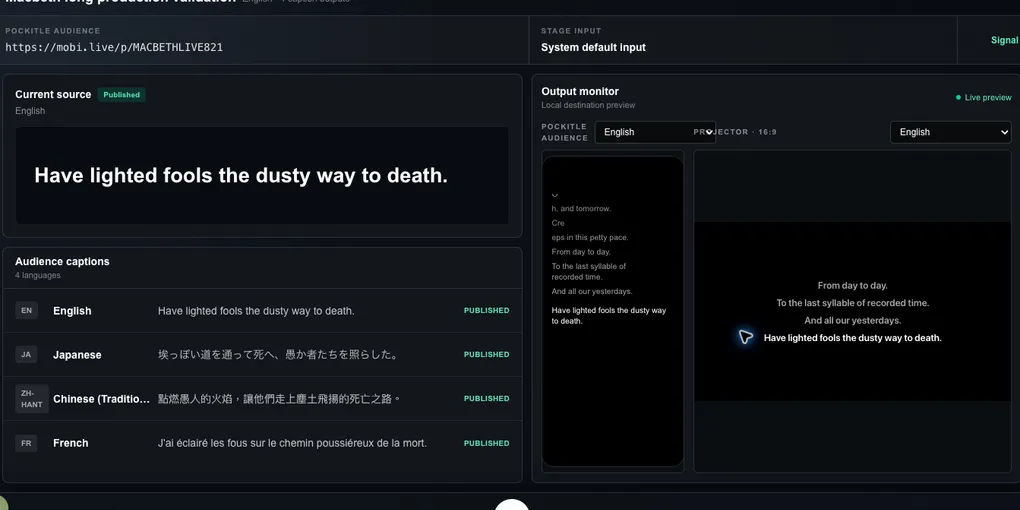
At one point, the live source caption committed:
“Have lighted fools the dusty way to death.”
The same committed fragment was published in several languages:
| Output | Live caption from the validation run |
|---|---|
| English | Have lighted fools the dusty way to death. |
| Japanese | 埃っぽい道を通って死へ、愚か者たちを照らした。 |
| Traditional Chinese | 點燃愚人的火焰,讓他們走上塵土飛揚的死亡之路。 |
| French | J’ai éclairé les fous sur le chemin poussiéreux de la mort. |
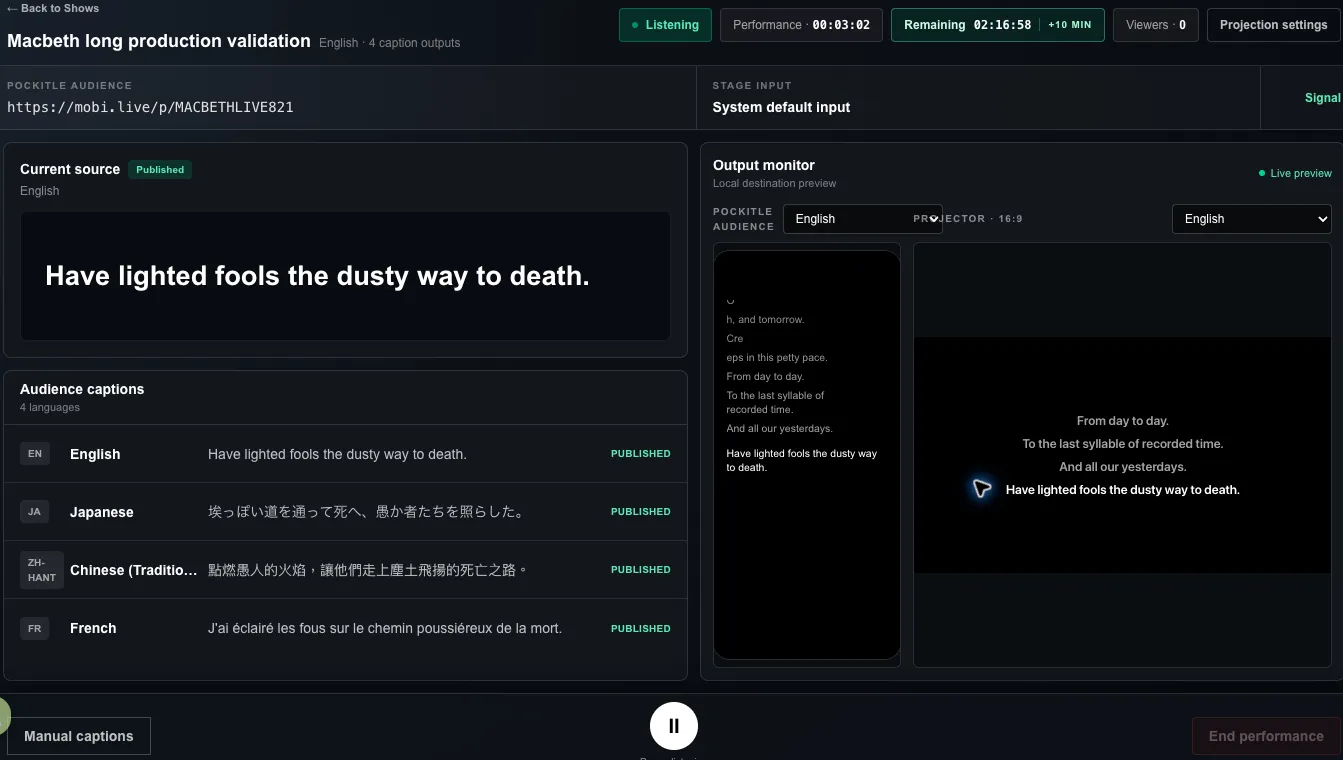
The Pockitle Live Console during the Macbeth validation run, showing the committed source caption, audience translations and venue display preview together.
These outputs are useful evidence because Pockitle is doing what live captioning is designed to do: publish the text it can commit at that moment. The difficulty is that the committed source fragment is no longer Shakespeare’s complete sentence.
The full thought is:
“And all our yesterdays have lighted fools The way to dusty death.”
Once the first half disappears, both grammar and imagery become unstable. In Traditional Chinese, lighted was interpreted as setting something on fire. In French, the fragment acquired a first-person subject — J’ai. In Japanese, the image was reorganised around a dusty road. Each translation is trying to make sense of an incomplete source.
With prepared surtitles, the team can work from the complete dramatic thought and make an editorial choice before the performance. For example — not as canonical Shakespeare translations, but as possible production-ready treatments:
| Language | Illustrative prepared surtitle |
|---|---|
| Traditional Chinese | 我們所有的昨日,都曾替愚人照亮那條走向死亡、歸於塵土的路。 |
| Japanese | われらのすべての昨日は、愚か者が死へ、塵へと向かう道を照らしてきた。 |
| French | Tous nos hiers ont éclairé aux fous le chemin vers la mort, vers la poussière. |
None of these is the correct translation of Macbeth. Another production might choose something more literal, more contemporary, more archaic or more compressed. That is precisely the advantage of prepared surtitling: the translator, director and surtitling team have time to decide what belongs to this production, then rehearse the wording and cue timing.
The same validation run shows a second, subtler issue. Shakespeare writes:
“Creeps in this petty pace from day to day.”
A live stream may commit it as two readable units:
“Creeps in this petty pace.” “From day to day.”
Nothing is necessarily mistranscribed, yet the rhetorical line has been cut in two. For improvised speech, that trade-off is often appropriate: the audience needs the words now. For scripted verse, the production may prefer a prepared cue break chosen for metre, breath, action and reading time.
This is why a stable production of Macbeth should normally use prepared surtitles through SurtitleLive. Pockitle is stronger where the words genuinely do not exist in advance — a post-show Q&A, an artist talkback, an improvised section or another unscripted moment.
Where Pockitle is the stronger choice
Pockitle is most useful when the words cannot be prepared honestly in advance.
Examples include:
- improvised theatre;
- devised performances whose spoken material changes substantially;
- unscripted audience interaction;
- post-show discussions and artist talkbacks;
- audience Q&As;
- panels and public conversations;
- lectures, workshops and community events;
- ceremonies, announcements and speeches;
- rehearsals or works in progress where the spoken text is still changing.
In these situations, a prepared cue list may be impossible, incomplete or misleading. Live captioning gives the audience a way to follow speech that only takes its final form in the room.
Many productions need both workflows
The choice between surtitling and live captioning does not always apply to an entire event.
A single theatre evening might use:
- SurtitleLive prepared surtitles for the scripted performance;
- Pockitle live captions for the post-show discussion;
- audience phones as one available reading route across both parts of the evening.
A festival may use SurtitleLive for an international scripted production, then use Pockitle for a panel involving the artists. A school may prepare titles for a scripted scene and use live captions for the students’ discussion afterwards.
This is not duplication. It is matching the text workflow to the moment in which the words are created.
Clear audio remains part of the caption service
Live caption quality begins before speech reaches the browser.
Pockitle works best when:
- the event uses one consistent spoken source language;
- microphones are close enough to capture clear speech;
- the venue can provide a controlled dialogue mix;
- speakers take turns rather than talking over one another;
- names and specialist terminology have been tested where possible;
- every promised language has been checked in the actual room.
It is less suitable for singing, music-led performance, sustained overlapping dialogue or events that frequently switch between spoken source languages.
Poor sound cannot be repaired by adding more translation languages.
Make an honest promise to the audience
Pockitle captions and translations are machine-generated. They may occasionally be delayed, incomplete or wrong.
That does not make the service without value. It means the production should describe it accurately.
Tell audiences:
- where the captions will appear;
- which languages are available;
- whether they need their own connected phone;
- whether a shared venue screen is provided;
- what the team will do if the caption route becomes unavailable.
Live captions also do not automatically provide every element of an accessibility-caption service. Depending on the audience and event, speaker identification, important sound information and professional captioning support may require additional planning.
Where accuracy is mission-critical, contractually guaranteed or part of a formal compliance requirement, a professional live captioner or CART provider may be the appropriate service.
See Pockitle in action
The public Pockitle demo shows how provisional speech develops into committed captions, how translations update, and how the same caption state appears on audience phones and a venue-style display.
The demonstration is prerecorded so visitors can inspect the product behaviour without opening a microphone or starting a live session. It is an explanation of the workflow, not a universal speed or accuracy benchmark.
After viewing the demo, test Pockitle with the actual voices, microphones, room and languages that will be used for the event.
Open Pockitle, view the supported languages, read the Pockitle Live Quick Start, or compare Pockitle Live with prepared theatre captions.
Prepare the words that can be prepared. Caption the words that cannot.