
4.2 How to Manage a Live Deployment
Manage viewer links, front-of-house materials, operator access, live subtitle updates, duration, and deployment retirement.
Page name: Deployment Cockpit
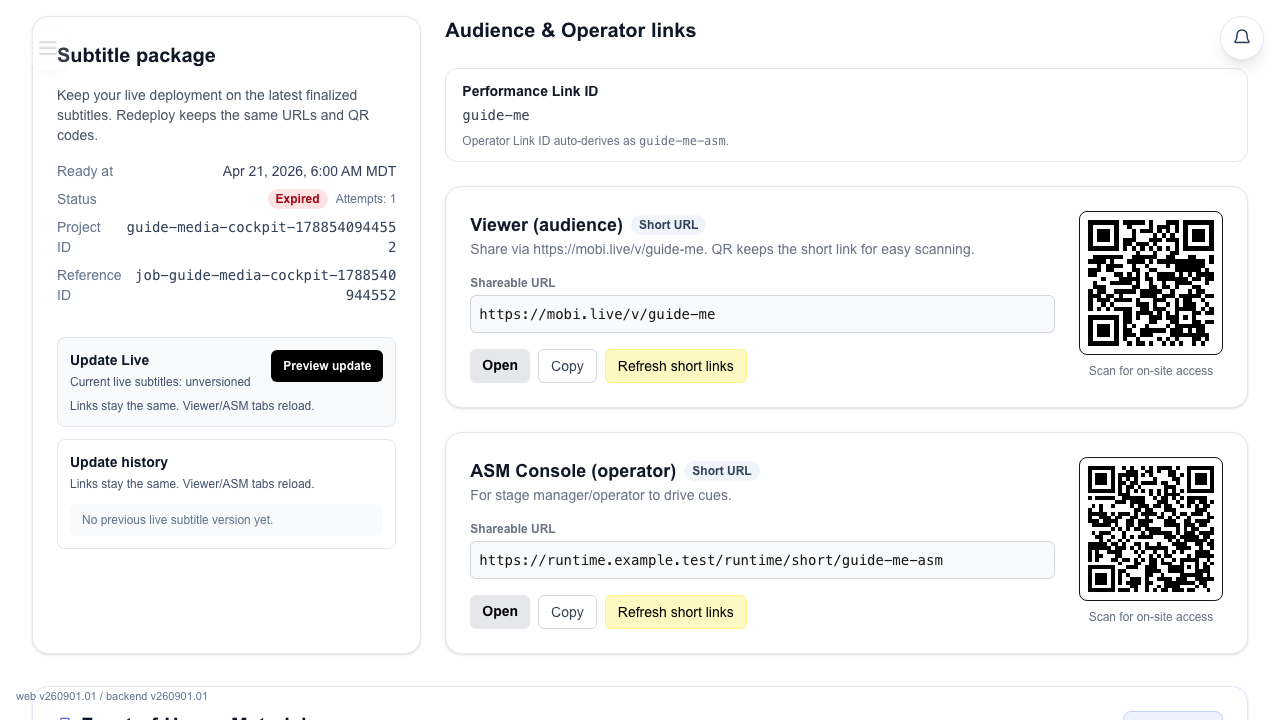
Use it for: links, QR access, live subtitle updates, password rotation, and end-of-show admin.
Open the right deployment
Deployment Cockpit is the post-deploy page for one live show.
- Deploy the show first.
- Open the deployment management action for that project.
- Pockitle Cue opens Deployment Cockpit.
If no deployment exists
The page does not fake a live state.
- You will see
No deployment found yet. - Use
Go to deployment wizardto return to setup.
Read the main sections
Refresh snapshotsits near the top of Deployment Cockpit and reloads the live status.Audience & Operator linksholdsViewer (audience)andASM Console (operator).Performance Link IDidentifies the current shared-link set.Front-of-House Materialsprepares audience QR, phone instructions, listing copy, and projector handoff notes for printing.- Submit saved Editor subtitles to the active deployment. During Live, or while an ASM console controls the show, submission waits for the operator to apply it in ASM.
Rotate ASM passwordchanges operator access in the lower danger-zone section.
Extend deployment duration
- Select
Extend Durationand wait for the success message. Refresh the deployment status if needed and check the updated expiry shown by Deployment Cockpit. - Only an owner or manager can extend an eligible live deployment. The
Extend Durationaction is unavailable to Free preview deployments, which have a fixed 60-minute window and cannot be extended. - When the current Access Pass reaches its extension cap, the page asks you to choose the next eligible Access Pass in Billing. After that pass is confirmed, use
Extend Durationbefore the current deployment expires. - An expired deployment cannot be extended. Deploy the project again to restore live access.
- Duration extension changes how long existing Viewer and ASM links remain accessible; it does not update subtitle content. Use
Update Livefor saved Editor changes.
Prepare front-of-house materials
Use the built-in pack when front-of-house staff need printable audience instructions or a projector handoff sheet.
- Open
Front-of-House Materialsin Deployment Cockpit. - Click
Set up pack. - Optionally fill
Venue Name,Show Date & Time,Performance Listing Copy, andProjector / Stage Manager Notes. - Click
Print FOH Pack, then use the browser print dialog to print or save as PDF.
The pack is saved in this browser for the current deployment. Verify or reprint it if the viewer access window changes. It is an operational handoff aid, not an accessibility or legal-compliance certification.
Use the page in this order
- Use
Refresh snapshotif the page may be stale. - Copy or open the viewer and ASM links.
- Prepare or reprint
Front-of-House Materialsbefore sharing audience QR posters. - Save in Editor, then submit Update Live from Editor or Deployment Cockpit. During Live or while ASM controls the show, open
Update subtitlesin the unlocked ASM top toolbar and confirmApply updateat a safe moment; submission alone does not change the audience subtitles. - Use
Rotate ASM passwordin the lower danger-zone section if you need an operator handoff. - Use
End Showin ASM when the performance finishes. Delete the deployment in the cockpit only if you intend to retire its Viewer and ASM links permanently.
FAQ
Common questions for this workflow, based on the current Pockitle Cue system.
Where do I manage a live deployment after setup?+
Use Deployment Cockpit to manage the live show, update subtitles, rotate the operator password, or copy links.
Who can update subtitles or rotate the operator password?+
Those actions are restricted to managers and owners on the deployment page. During Live or while ASM controls the show, open Update subtitles in the unlocked ASM top toolbar and confirm Apply update at a safe moment; submission alone does not change the audience subtitles.
Deployment Workflow
Continue In This Workflow
Script preparation, translation workflow, live deployment, operator control, and runtime troubleshooting.
4.3 How to Update Live Subtitles After Deployment
Submit saved Editor subtitles to the active deployment. During Live, or while an ASM console controls the show, submission waits for the operator to apply it in ASM.
4.4 Using the Operator Cockpit
Run live theatre subtitle cues from the Pockitle Cue Operator Cockpit, manage Intermission and blackout states, and control what audiences see.
5.1 Projection and Mobile: What Each Output Does
Understand how room-visible projection and audience-phone subtitles differ, and why many shows use both from the same live cue state.