
5.1 投影與手機:每種輸出的作用
了解全場可見的投影字幕與觀眾手機字幕有何不同,以及為什麼許多演出會從同一個現場 cue 狀態同時驅動兩種輸出。
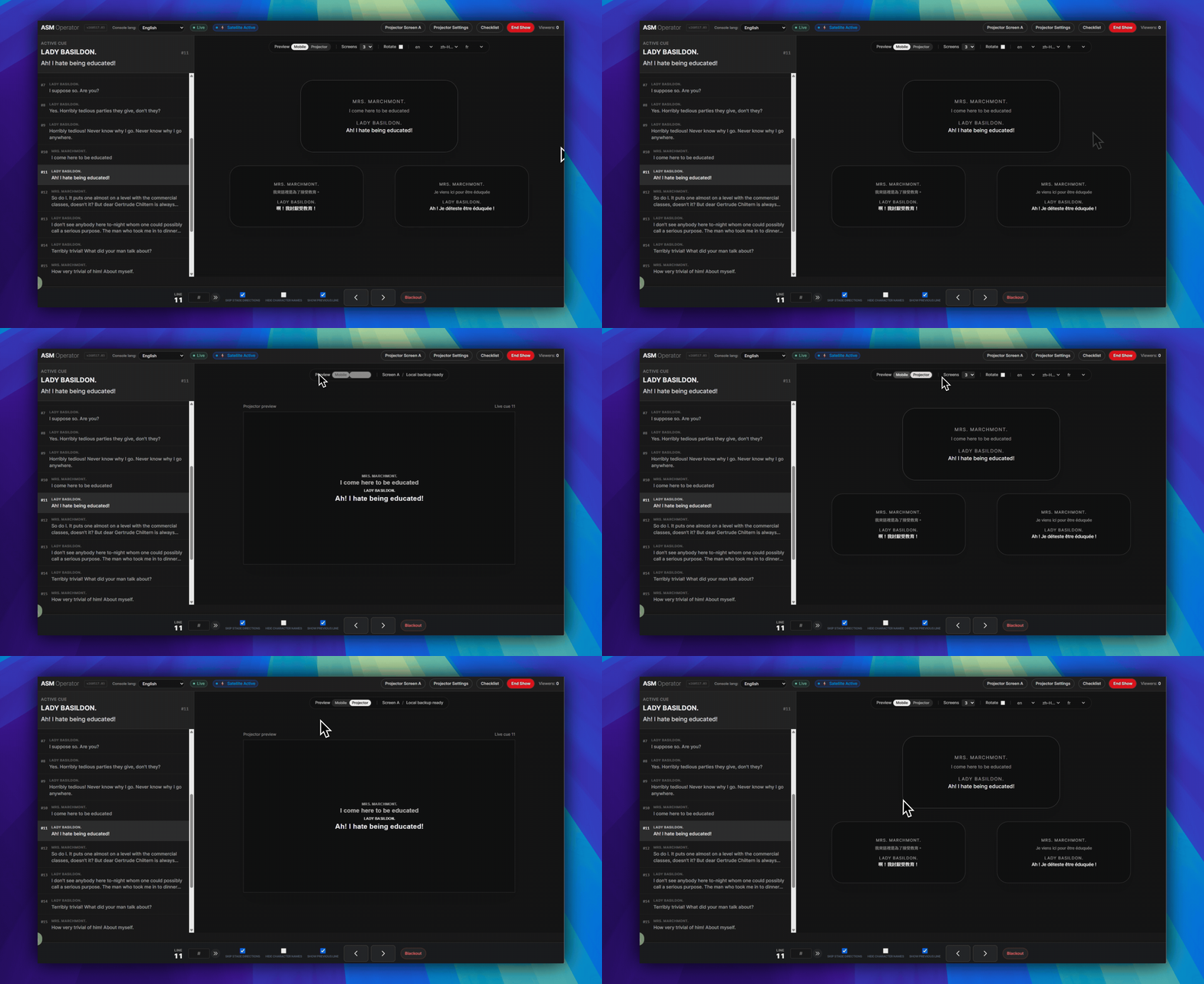
簡單規則:投影面向整個場館。手機字幕面向每位觀眾自己的手機。
兩者可以同時運作:同一個現場 cue 狀態可以驅動兩種輸出,但它們的傳遞方式與網路運作方式並不相同。
投影
- 投影是場館內可見的字幕輸出。
- 當觀眾需要閱讀同一個共享螢幕時使用投影。
- 投影機輸出使用投影機設定、投影機畫面 A 和投影機視窗。
- 如果 ASM 和投影機視窗已經開啟,場地網際網路中斷後,投影文字可能仍會繼續回應。
手機
- 手機是每位觀眾手機上的個人字幕畫面。
- 當觀眾需要個人閱讀距離、語言選擇,或無須安裝 App 的瀏覽器流程時使用手機字幕。
- 手機上的 Viewer 透過觀眾 Viewer 連結或 QR 碼加入。
- 手機字幕仍透過雲端傳送。如果場館沒有網際網路,手機將無法繼續接收字幕。
何時同時使用
- 當場館需要共享投影字幕,同時部分觀眾也需要手機存取時,同時使用兩者。
- 當一組觀眾看舞台螢幕,另一組需要不同閱讀位置或語言時,同時使用兩者。
- 同一個 ASM cue 狀態可以在演出期間保持兩種輸出同步。
重要限制
接下來閱讀
- 如需設定投影機本身,請繼續閱讀 使用投影機設定。
- 如需了解已準備好的本機投影不中斷,以及 ASM 內用於手機和投影機字幕檢查的檢查清單,請繼續閱讀 為演出前準備 Projection Mode。
- 如需了解觀眾手機進入方式,請繼續閱讀 觀眾如何透過 Viewer 連結或 QR 碼加入。
常見問題
依據目前 SurtitleLive 系統整理的此工作流程常見問題。
What is the difference between Projection and Mobile in SurtitleLive?+
Projection is the room-visible output on a projector or LED screen. Mobile is the personal browser-based viewer on audience phones. They can run from the same live cue state, but they are not the same output path.
Which output is more resilient during venue internet loss?+
If ASM and the projector window were already open, projected text may keep responding after venue internet loss. Phones will not.
If Projection is still working, will phones keep receiving subtitles too?+
No. Projector continuity and mobile delivery are separate. If the venue has no internet, phones will not keep receiving mobile surtitles just because the already-open projector window is still responding.
部署工作流程
繼續此工作流程
劇本準備、翻譯流程、現場部署、操作員控制與 runtime 疑難排解。